Class-based DSC resources are the way forward. Period. At least, if it wants to
adopt new capabilities that Microsoft DSC’s engine exposes, like the Export
method signature.
Whilst there are a ton of script-based DSC resources available in this community, slowly, more class-based start to appear. Now, with Microsoft DSC, two new features were launched during release v3.2: resource discovery and optimizing the execution have become more explicit. In this case, DSC’s engine needs a so-called adapted resource manifest, describing the resource, its capabilities, and their JSON schema representation.
That leaves maintainers of the current class-based resources with a question: should every existing class-based resource now have a hand-written manifest too?
The goal of the newly introduced DscResource.Authoring module is to remove
that manual step. The module is capable of reading class-based DSC resources
from a .ps1, .psm1, or .psd1 file. It then extracts their DSC properties
and implemented methods, in the end, producing either a single resource manifest
(*.dsc.manifests.json) or for each class a separate file (*.dsc.adaptedResource.json).
Each DSC community project stored in the organization uses the standardized scaffolding layout from Sampler, giving a place to make this manifest generation repeatable: the build script. Each DSC community project can thus generate adapted resource manifests for class-based resources in three simple steps:
- Add the module dependency in
RequiredModules.psd1. - Update
build.yamlwith the tasks to import from that new module dependency using theTask.*alias. - Update the build workflow to include the new task(s).
In this blog post, we go into more detail about why these adapted resource manifests matter, what the module actually creates, and how you can adopt it with ease.
Why adapted resource manifests matter
Adapted resource manifests slowly started emerging in DSC’s engine to help transition existing PSDSC resources. The original issue has been lost, but the pull request isn’t.
In its simplest form, an adapted resource manifest defines how DSC should discover a resource that is implemented somewhere else. It tells DSC what the resource is called, which adapter is required to invoke it, where the resource definition lives, which operations it supports, and what shape the resource input and output should have.
For example, an adapted resource manifest for the Microsoft.WinGet.DSC/WinGetPackage
resource would look something like this:
{
  "$schema": "https://aka.ms/dsc/schemas/v3/bundled/adaptedresource/manifest.json",
  "type": "Microsoft.WinGet.DSC/WinGetPackage",
  "kind": "resource",
  "version": "1.12.440",
  "capabilities": [
    "get",
    "test",
    "set"
  ],
  "description": "PowerShell Module with DSC resources related to WinGet configurations",
  "author": "Microsoft Corporation",
  "requireAdapter": "Microsoft.Adapter/PowerShell",
  "path": "Microsoft.WinGet.DSC.psd1",
  "schema": {
    "embedded": {
      "properties": {
        "Id": {
          "type": "string",
          "title": "Id",
          "description": "The Id property."
        },
        "Source": {
          "type": "string",
          "title": "Source",
          "description": "The Source property."
        },
        "Version": {
          "type": "string",
          "title": "Version",
          "description": "The Version property."
        },
        "Ensure": {
          "type": "string",
          "enum": [
            "Absent",
            "Present"
          ],
          "title": "Ensure",
          "description": "The Ensure property."
        },
        "MatchOption": {
          "type": "string",
          "enum": [
            "Equals",
            "EqualsCaseInsensitive",
            "StartsWithCaseInsensitive",
            "ContainsCaseInsensitive"
          ],
          "title": "MatchOption",
          "description": "The MatchOption property."
        },
        "UseLatest": {
          "type": "boolean",
          "title": "UseLatest",
          "description": "The UseLatest property."
        },
        "InstallMode": {
          "type": "string",
          "enum": [
            "Default",
            "Silent",
            "Interactive"
          ],
          "title": "InstallMode",
          "description": "The InstallMode property."
        }
      },
      "additionalProperties": false,
      "description": "PowerShell Module with DSC resources related to WinGet configurations",
      "$schema": "https://json-schema.org/draft/2020-12/schema",
      "title": "Microsoft.WinGet.DSC/WinGetPackage",
      "type": "object",
      "required": [
        "Id",
        "Source"
      ]
    }
  }
}
There are a few important parts in this file. The type is the name DSC uses to
identify the resource. The capabilities array tells DSC which operations
the resource supports. The requireAdapter value tells DSC which adapter to use.
The path points to the PowerShell module manifest file.
Finally, the embedded JSON schema describes the resource properties,
including their names, types, descriptions, and whether DSC should allow
additional properties.
It’s a lot of metadata to maintain by hand, especially when you have more
class-based resources. But it still didn’t fully answer the question of why
the adapted resource manifest matters. See, most examples found in DSC’s repository
just define the direct type:
$schema: https://aka.ms/dsc/schemas/v3/bundled/config/document.json
resources:
- name: MyApp
  type: Microsoft.WinGet.DSC/WinGetPackage
  properties:
    Id: Microsoft.VisualStudio.Code
    Ensure: Present
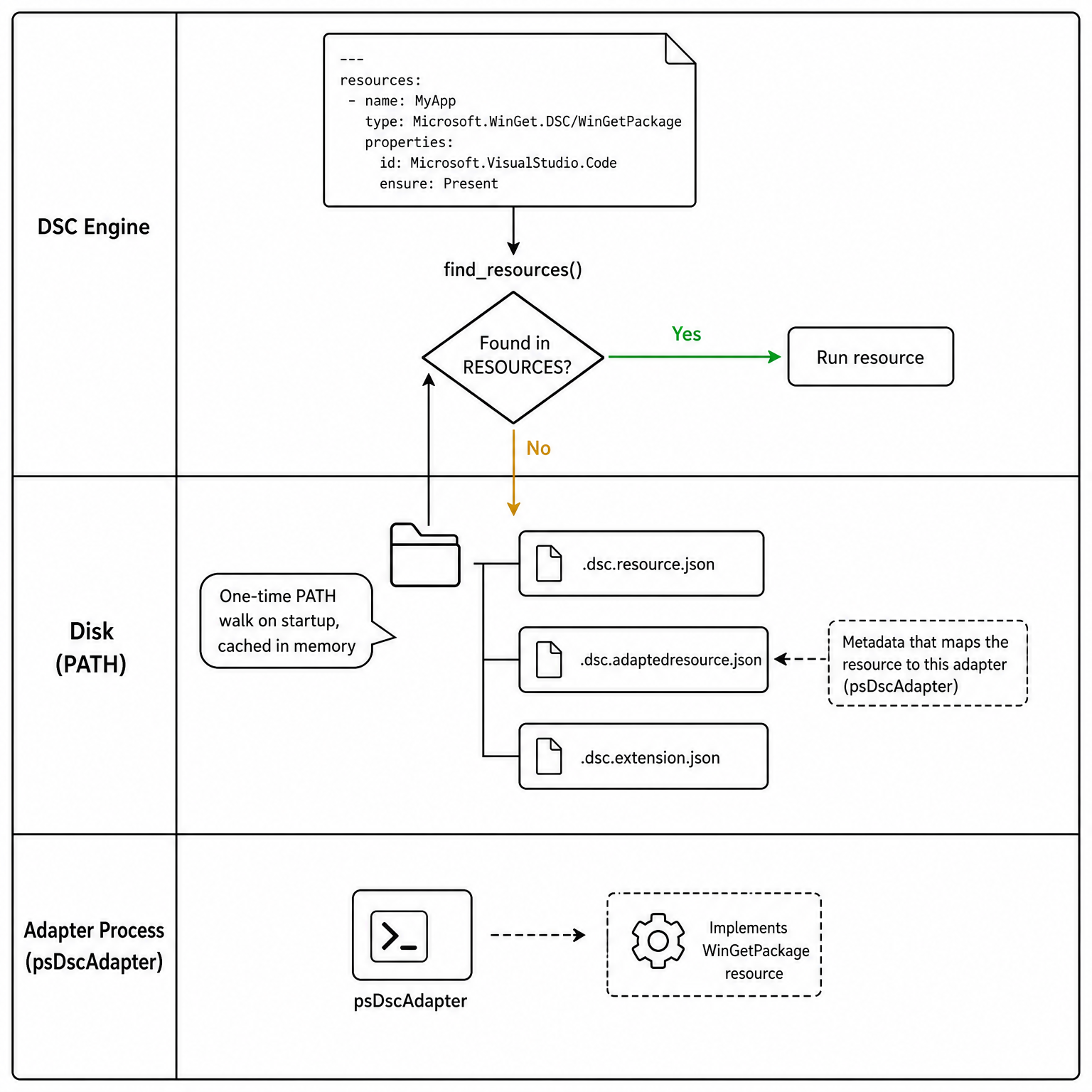
Now, DSC doesn’t know if this is a command-based resource. It will quickly find
out if it can’t find the *.dsc.resource.json file on the PATH. It will
then search for adapted resource manifest file(s), and if that’s not found,
it’ll go through each adapter on the system. And anyone who knows adapters
knows they have an initial cost at the time of discovery and execution.
The following image illustrates this process:
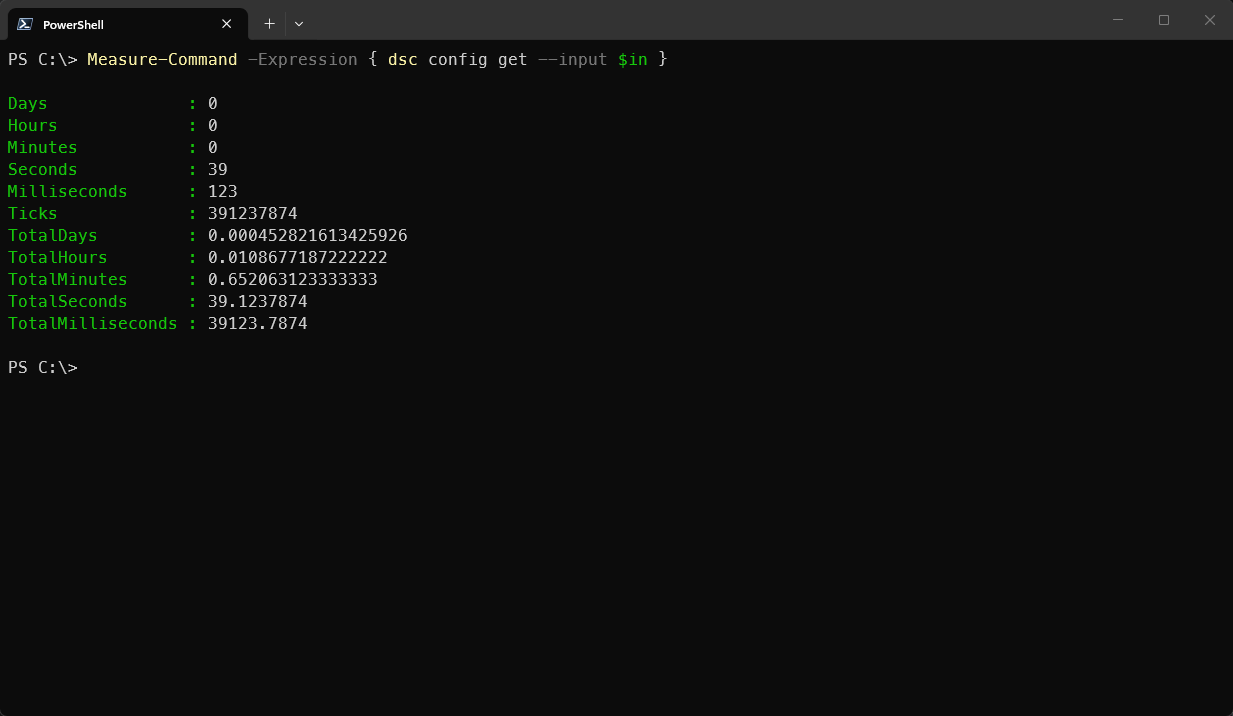
Let’s take it one more step further and already see what happens when running
the resource with and without an adapted resource manifest based on performance.
The first image measures how long it runs on an initial dsc.exe installation
without an adapted resource manifest:
For the second run, the above adapted resource manifest was added in the
$env:PSModulePath and an additional element was added (requireAdapter):
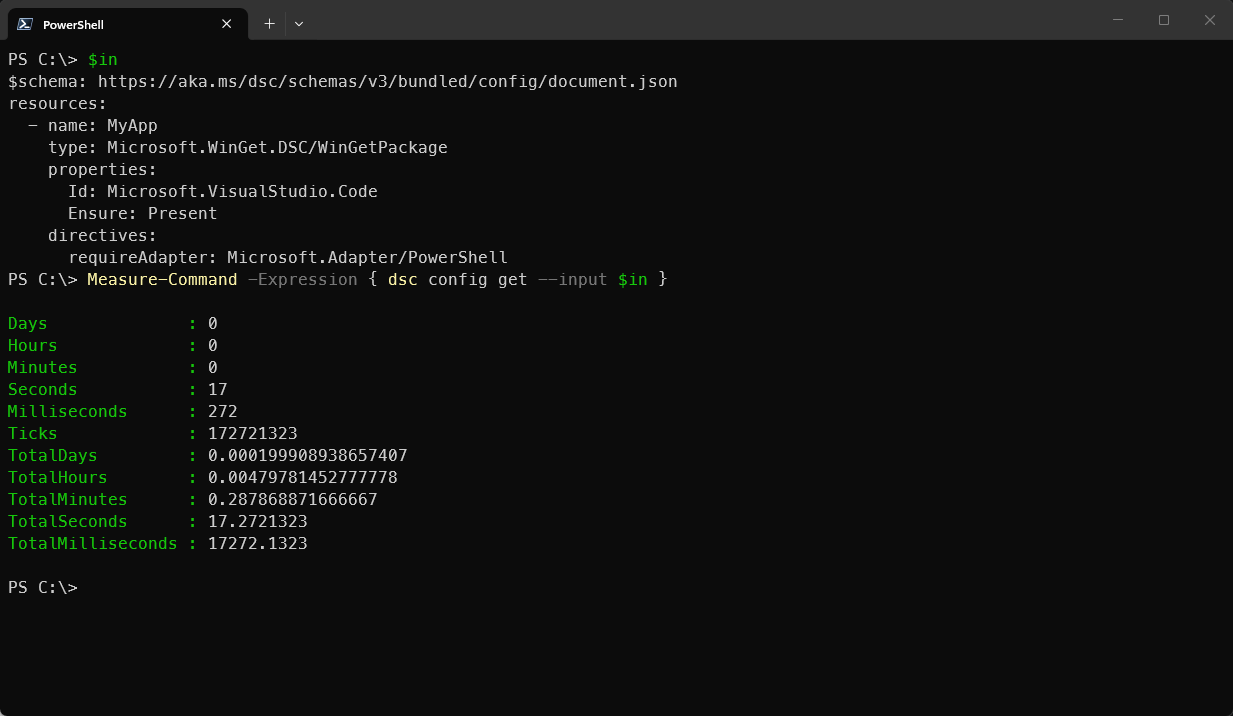
It’s twice as fast! This makes consuming PSDSC class-based resources easier to
consume for DSC’s adapter model. Plus, you can now run dsc resource schema
command against the adapted resource.
Microsoft.Adapter/PowerShell is the default. Only the PowerShell 7+ adapter
supports adapted resources. Windows PowerShell is not supported.
What the module generates
You’ve now learned that adapted resource manifests help in discovery. But they also speed up the process of execution as they bypass certain areas in the adapter itself, like caching.
Now, as mentioned already, crafting such adapted resource manifests by hand for
each of your class-based resources can be time-consuming. They can also drift
if you modify the source code, but forget to update the *.dsc.adaptedResource.json
file. That begs the question, what does the module generate?
The easiest way to understand the output is to walk through the class metadata
that DscResource.Authoring inspects. It reads the module manifest, class declaration,
methods, properties, validation attributes, and it’s even looking at
comment-based help at the top of a class. All those pieces together generate the
adapted resource manifest structure already seen above.
The module does not invent a new resource model. Instead, it builds on top of it.
Let’s start by going through one of the commands: New-DscAdaptedResourceManifest.
If you target a .psd1 file, the module attempts to resolve the root module.
Next up, the module name, version, author, and description are grabbed.
If you take the .psd1 file from the Microsoft.WinGet.DSC module:
@{
    RootModule    = 'Microsoft.WinGet.DSC.psm1'
    ModuleVersion = '1.12.440'
    Author        = 'Microsoft Corporation'
    Description   = 'PowerShell Module with DSC resources related to WinGet configurations'
}
It becomes the top-level manifest metadata:
{
  "$schema": "https://aka.ms/dsc/schemas/v3/bundled/adaptedresource/manifest.json",
  "type": "Microsoft.WinGet.DSC/WinGetPackage",
  "kind": "resource",
  "version": "1.12.440",
  "description": "PowerShell Module with DSC resources related to WinGet configurations",
  "author": "Microsoft Corporation",
  "requireAdapter": "Microsoft.Adapter/PowerShell",
  "path": "Microsoft.WinGet.DSC.psd1"
}
You can now clearly see the requireAdapter defined in the adapted resource
manifest and the earlier image when the example was run. These factors tell
the engine what adapter is required when you run a configuration document
leveraging PSDSC class-based resources.
With the top-level defined, the module starts inspecting which methods are
implemented on the class. The helper looks for methods named Get, Set,
Test, WhatIf, SetHandlesExist, Delete, and Export. Here you immediately
see why class-based resources are the preferred way forward because
script-based can only implement Get, Set, and Test.
[DscResource()]
class WinGetPackage {
    [WinGetPackage] Get() { return $this }
    [void] Set() { }
    [bool] Test() { return $true }
    static [WinGetPackage[]] Export() { return @() }
}
Those methods become the capabilities array in the adapted resource manifest:
{
  "capabilities": [
    "get",
    "set",
    "test",
    "export"
  ]
}
After that, the module walks the DSC properties. It only includes properties
decorated with [DscProperty()]. A key property is also treated as required,
because a class-based DSC resource cannot identify an instance without its key.
[DscProperty(Key)]
[string] $Id

[DscProperty(Mandatory)]
[string] $Source

[DscProperty()]
[bool] $UseLatest
This produces the following JSON schema shape:
{
  "required": [
    "Id",
    "Source"
  ],
  "properties": {
    "Id": {
      "type": "string",
      "title": "Id"
    },
    "Source": {
      "type": "string",
      "title": "Source"
    },
    "UseLatest": {
      "type": "boolean",
      "title": "UseLatest"
    }
  }
}
The above JSON shape only misses the description element compared to the earlier
one seen in the previous section. And that’s for a reason. The DSC community
standardizes the comment-based help above class-based resources seen in, for example,
the SqlAudit from SqlServerDsc. But don’t worry, you’ll learn how this can
be overwritten if it’s not present in the original source.
That’s in the basic form what the function does. There are more scenarios, like
[ValidateSet()] attribute, but more information can be found in the wiki
for that. It’s time to look further at some of the commands.
Generating adapted resource manifests
The New-DscAdaptedResourceManifest is the main entry point to create a
DscAdaptedResourceManifest type. Now, let’s say you want to create the
adapted resource manifests for the Microsoft.WinGet.DSC module. The module
itself contains five classes. To create each individual file, you can run the
following example:
$module = Get-Module Microsoft.WinGet.DSC -ListAvailable |
    Sort-Object -Property Version -Descending |
    Select-Object -First 1

$manifests = New-DscAdaptedResourceManifest -Path $module.Path # Import the .psd1 file
$manifests.Count # Should return five

foreach ($manifest in $manifests) {
    $type = $manifest.Type.Split("/")[-1]
    $sourcePath = Split-Path -Path $module.Path -Parent
    $outputPath = Join-Path -Path $sourcePath -ChildPath "$type.dsc.adaptedResource.json"

    # Generate JSON variant
    $manifest.ToJson() | Set-Content -Path $outputPath -Encoding UTF8
}
This generated five adapted resource manifest files.
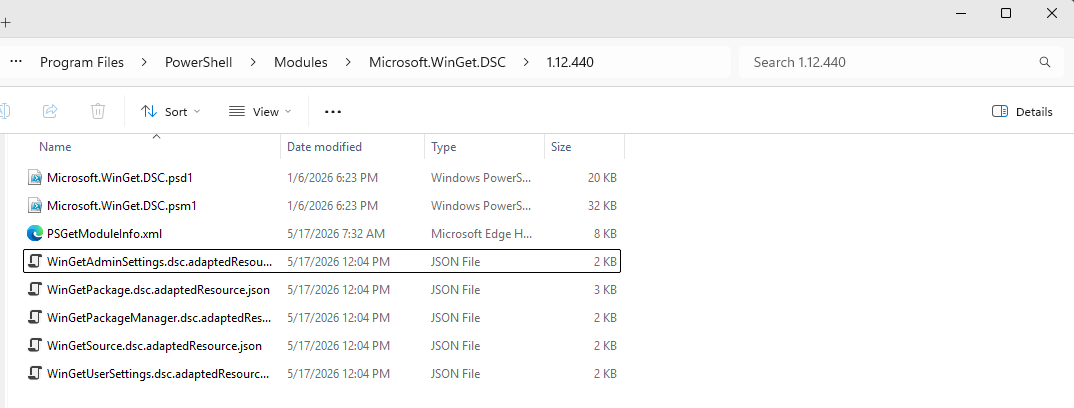
If you inspect the WinGetPackage.dsc.adaptedResource.json file, you still
notice that description elements are still added. But all of these contain
default values.
{
  // redacted
  "schema": {
    "embedded": {
      "type": "object",
      "required": [
        "Id",
        "Source"
      ],
      "description": "PowerShell Module with DSC resources related to WinGet configurations",
      "properties": {
        "Id": {
          "type": "string",
          "title": "Id",
          "description": "The Id property."
        },
        "Source": {
          "type": "string",
          "title": "Source",
          "description": "The Source property."
        },
        "Version": {
          "type": "string",
          "title": "Version",
          "description": "The Version property."
        },
        "Ensure": {
          "type": "string",
          "enum": [
            "Absent",
            "Present"
          ],
          "title": "Ensure",
          "description": "The Ensure property."
        },
        "MatchOption": {
          "type": "string",
          "enum": [
            "Equals",
            "EqualsCaseInsensitive",
            "StartsWithCaseInsensitive",
            "ContainsCaseInsensitive"
          ],
          "title": "MatchOption",
          "description": "The MatchOption property."
    // redacted
        }
      }
    }
  }
}
That’s where you can use a combination of New-DscPropertyOverride and
Update-DscAdaptedResourceManifest. Imagine you want to update the
description on Version:
$override = New-DscPropertyOverride `
    -Name 'Version' `
    -Description 'Specify the exact version to install.'

$manifest |
    Update-DscAdaptedResourceManifest -PropertyOverride $override |
    ForEach-Object { $_.ToJson() }
You can use this to perform post-processing where the generated schema need more attention. Time to look at the final part: how can resource authors easily adopt it in their existing workflows
Automate generation in build.yaml
Each DSC community module contains a build.yaml. To easily adopt the automatic
generation of an adapted resource manifest, you can define one of the two build
tasks:
Create_DscAdaptedResourceManifests- which generates*.dsc.adaptedResource.jsonfiles for each class-based resourceCreate_DscResourceManifestsList- which generates*.dsc.manifests.jsonfile containing multiple entries to adapted resources
Say you have the following build.yaml file:
####################################################
# Pipeline Build Task Configuration (Invoke-Build) #
####################################################
BuildWorkflow:
  '.':
    - build
    - test

  build:
    - Clean
    - Build_Module_ModuleBuilder
    - Build_NestedModules_ModuleBuilder
    - Create_Changelog_Release_Output

  docs:
    - Clean_WikiContent_Folder
    - Check_SqlServer_Availability
    - Generate_Conceptual_Help
    - Generate_Wiki_Content
    - Generate_Wiki_Sidebar
    - Clean_Markdown_Metadata
    - Package_Wiki_Content

  pack:
    - build
    - docs
    - package_module_nupkg # cSpell: disable-line

  hqrmtest: # cSpell: disable-line
    - Invoke_HQRM_Tests_Stop_On_Fail

  test:
    - Pester_Tests_Stop_On_Fail
    - Convert_Pester_Coverage
    - Pester_If_Code_Coverage_Under_Threshold

  publish:
    - Publish_Release_To_GitHub
    - Publish_Module_To_gallery
    - Publish_GitHub_Wiki_Content
After the build task, you can add one of the two tasks mentioned above. Let’s
say you want to create individual files for each class-based DSC resource,
you can add the following snippet:
####################################################
# Pipeline Build Task Configuration (Invoke-Build) #
####################################################
BuildWorkflow:
  '.':
    - build
    - test

  build:
    - Clean
    - Build_Module_ModuleBuilder
    - Build_NestedModules_ModuleBuilder
    - Create_Changelog_Release_Output
    - Create_DscAdaptedResourceManifests # The line creating adapted resource manifest(s)
  # Truncated

# Import ModuleBuilder tasks from a specific PowerShell module using the build
# task's alias. Wildcard * can be used to specify all tasks that has a similar
# prefix and or suffix. The module contain the task must be added as a required
# module in the file RequiredModules.psd1.
ModuleBuildTasks:
  # Truncated
  DscResource.Authoring:
    - 'Task.*' # Line to import the available task from the module
This results in the following being generated:
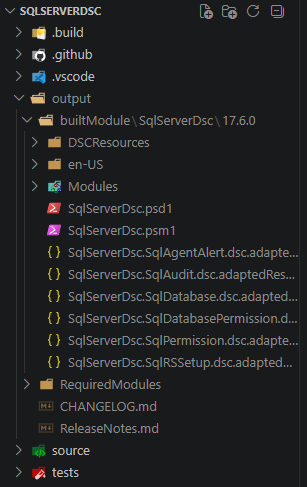
The example above used the SqlServerDsc module as it contained multiple
class-based resources.
Through the build.yaml file, you can always apply customizations. Here’s
an example snippet to overwrite the Ensure property on a resource called MyResource:
DscResource.Authoring:
  Create_DscAdaptedResourceManifests:
    FileNamePattern: '{ProjectName}.{ResourceName}.dsc.adaptedResource.json'
    PropertyOverrides:
      MyResource:
        - Name: Ensure
          Description: Specifies whether the resource should exist.
          JsonSchema:
            default: Present
Wrap-up
You’ve just learned that adapted resource manifests make class-based DSC resources easier for Microsoft DSC to discover, understand, and execute. They remove the guessing game, especially around the two PowerShell adapters. When the time was measured, it made visible that adapted resource manifests were way quicker by short-circuiting the process in the engine.
But the important part is that you should not have to maintain those files by hand
Especially because there’s already a ton of automation around DSC community modules.
The DscResource.Authoring module was brought to life using this information in
existing repositories. From there, it can be hooked into the existing build
workflows with ease.
If you maintain a DSC community module with class-based resources, or you’ve now been inspired to create them, then this next step can be added simply. The short version:
- Open the
build.yaml - Choose one of the two tasks exposed from
DscResource.Authoring - Add one of them
- Generate the manifest and inspect the output
These adapted resource manifest(s) can be shipped with your module and will be discovered by the PowerShell discovery extension from DSC’s engine.